Hugeicons Font Generator
Select your favorite icons and generate a custom icon font
Log in to generate custom icon fonts.
Rounded:
Standard:
Sharp:
Icon Font Generator Features
Discover the features that make Hugeicons icon font generator the most efficient way to generate icon fonts.
Custom Icon Upload
Upload your own SVG icons and generate custom icon fonts for free!
Combine Icon Libraries
With Hugeicons Icon Font Generator, you can create a single font package containing icons from both Hugeicons icon library and custom SVG icons you upload from any other sources.
Major Dev Framework Support
The generated icon fonts work across all modern frameworks and platforms including React, Vue, Flutter, Svelte, Angular, React Native, as well as lesser known frameworks like Blade and Django.
Lightweight file
Generate a lightweight icon font file and enjoy faster page loads and better performance across web and mobile apps.
Private CDN
Host your Icon Fonts on our fast, and reliable private CDN and ensure your custom icons load instantly.
Available Font Formats
Hugeicons Icon Font Generator lets you generate icon fonts in various icon font formats like TTF, WOFF, WOFF2 and EOT.
Icon Font Generation from Hugeicons' Icons
Here's how to generate icon fonts from Hugeicons' icon library of 60,000+ icons.
Browse or Search Icons: Find the icon you're looking for by typing keywords or scrolling through the organized icons. Our search system instantly returns relevant results to help you find just the icons you need.
You can also select a specific style of icon from the 10 styles of icons Hugeicons offers.
Select Your Favourite Icons: Click on the icons to select as many icons you want to convert to icon font.
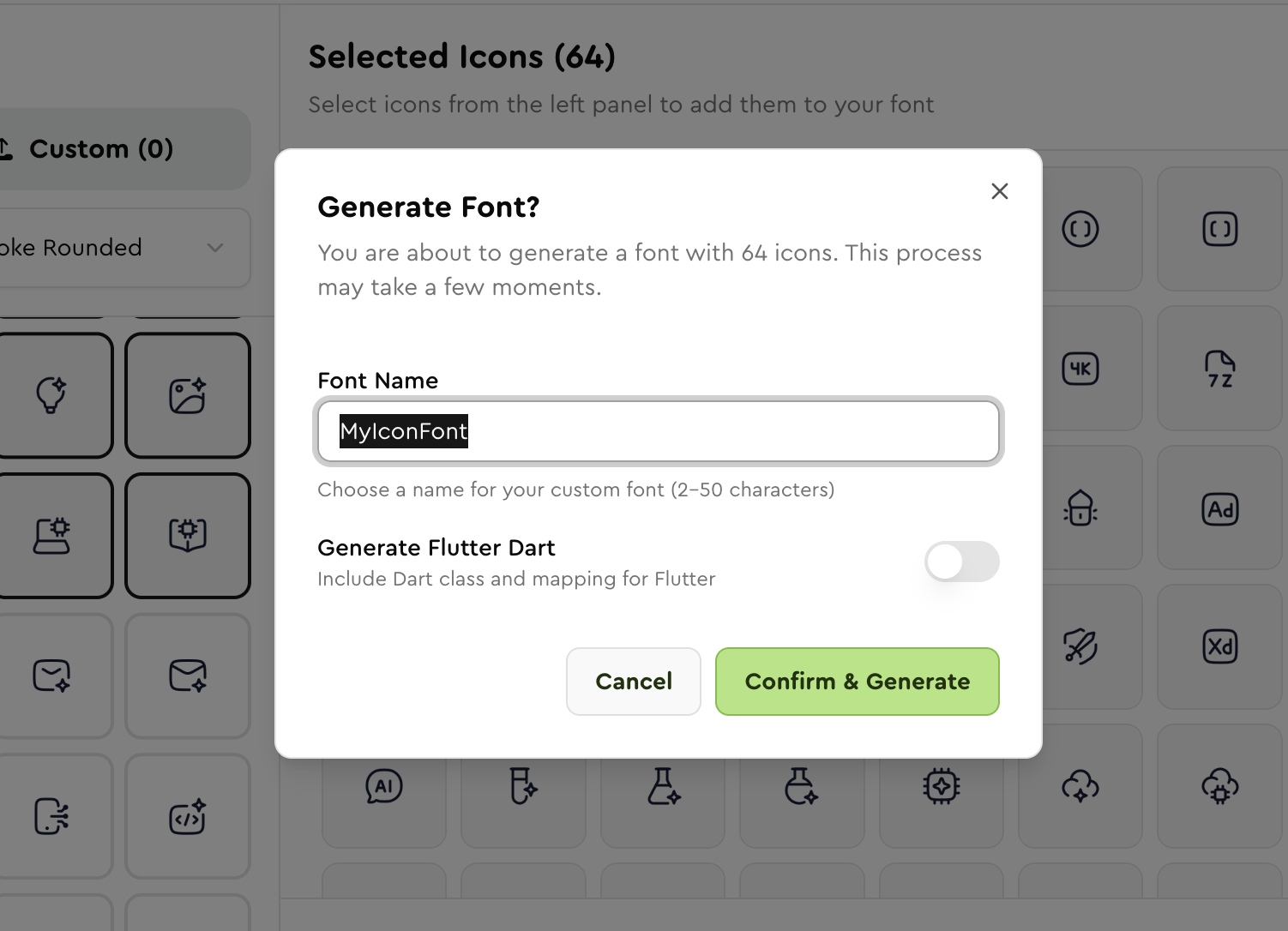
Generate and Download ZIP File: After selecting the icons, click on the "Generate Font" button. You can name the icon font file in the following screen.
You can also generate Flutter Dart that includes Dart class and mapping for Flutter from there. Finally click "Confirm & Generate" to download the icon font ZIP file.
Publish to CDN & Get Link: After downloading your Icon Font file, Hugeicons Pro users can click on "My Fonts" on top right of the Icon font generator tool and publish the file to our private CDN, and get links for the generated icon fonts in formats like WOFF, WOFF2, EOT and TTF.
Create Your Own Custom Icon Font
You can turn your own icons taken from any source on the internet into icon fonts with Hugeicons' custom Icon Font Generator.
Open the Tool & Select "Custom"
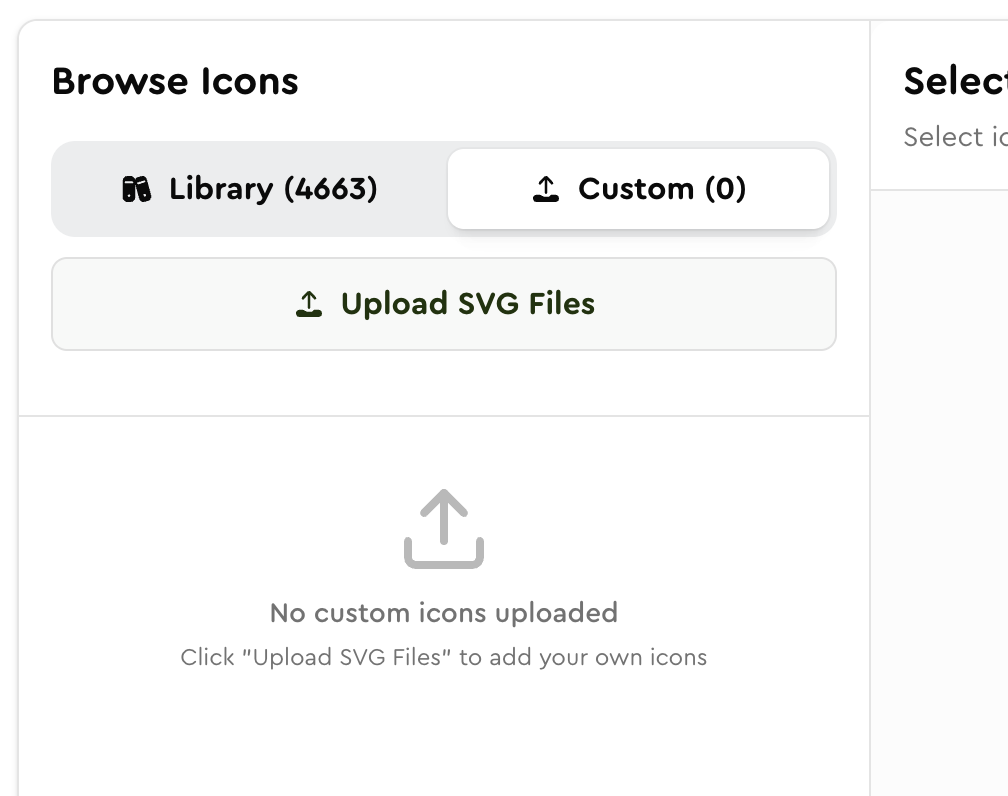
Start by opening the Icon Font Generator page, then switch to the "Custom" tab right beside the "Library (4663)" tab to upload your own SVG icons.
Upload Your SVG Icons
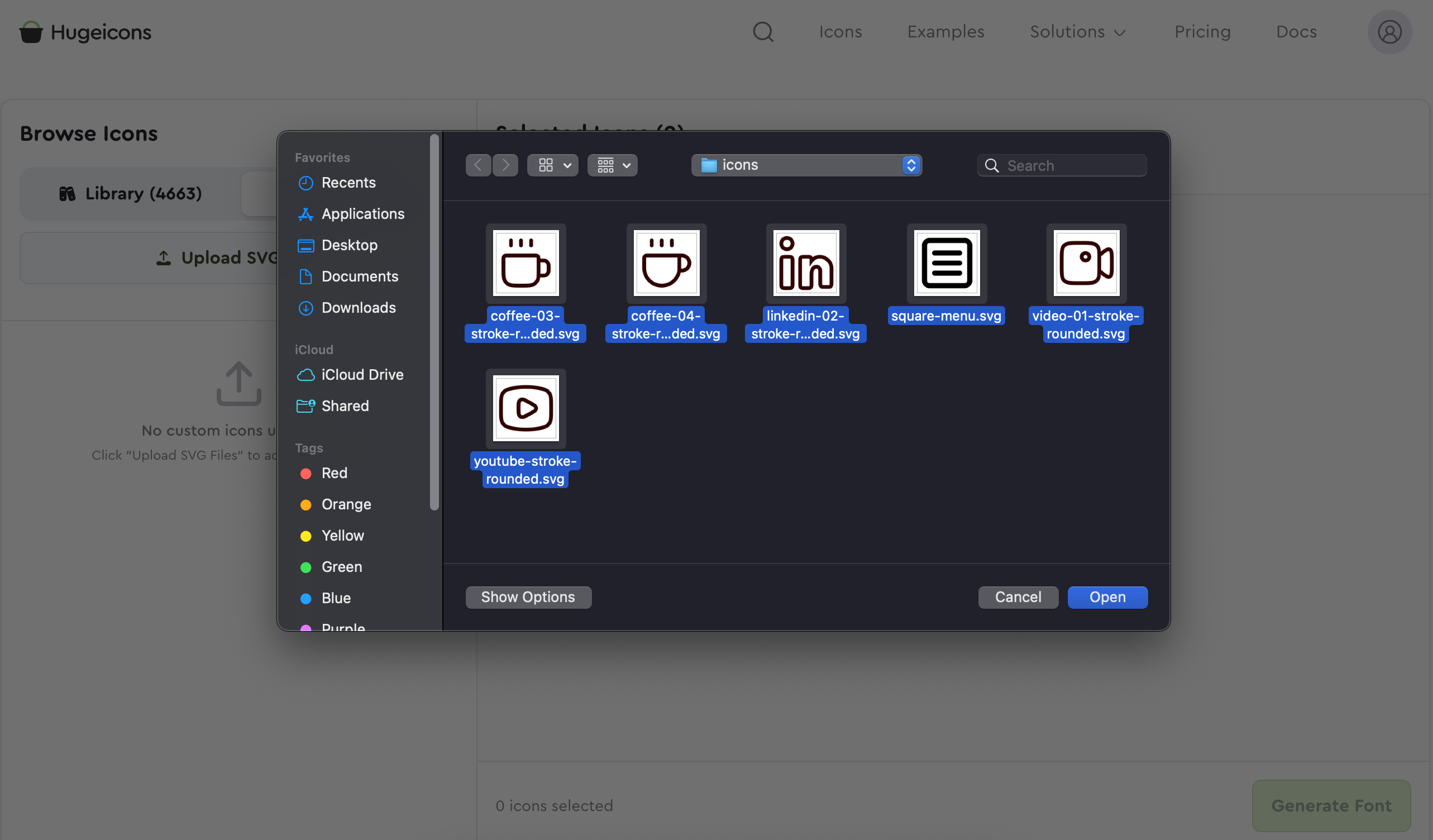
Click the Upload SVG Files button and import all your SVG files directly from your own local storage. The uploaded icons will now appear in the custom icon panel for selection.
Generate Icon Font & Download
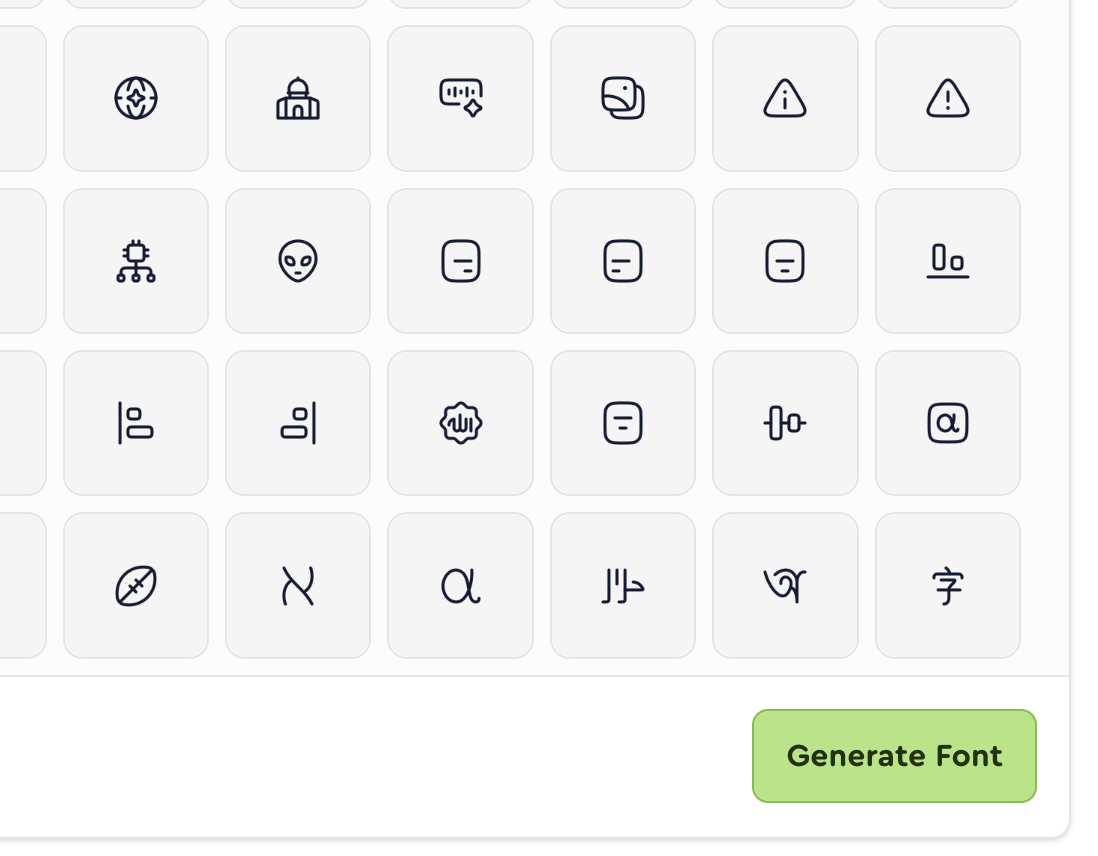
After selecting the icons, click on the "Generate Font" button. You can name the icon font file in the following screen. You can also generate Flutter Dart that includes Dart class and mapping for Flutter from there. Finally click "Confirm & Generate" to download the Icon Font ZIP file.
Publish & Get CDN Link
After downloading your Icon Font file, Pro users can click on "My Fonts" and publish the file to our private CDN and get links for the generated Icon Fonts in formats like WOFF, WOFF2, EOT, and TTF.
Performance Benefits of Icon Fonts
Improve load times and reduce overhead with a single, optimized icon font file.
Speed Up Development
Icon fonts eliminate repetitive asset management tasks. Work with a single font file instead of using multiple image files, enabling faster prototyping and instant icon updates through simple class name changes.
Developer Friendly Integration
Icon Fonts make things incredibly simple for developers. Icon Font icons are just like text characters. You use straightforward CSS classes and you're done; no dependency for multiple image files or complicated import systems to use icons on your site. Icon fonts reduce setup time, so new team members can jump in and start using icons right away without needing a manual.
Reduced HTTP Requests
With traditional icons, each icon sends its own HTTP request, which can quickly slow down your site. Icon fonts solve this by bundling everything into a single file request. This significantly improves load times, especially when the interface is icon heavy, like dashboards and mobile apps.
Faster Load Times with WOFF2
WOFF2 compresses icon fonts incredibly well, about approximately 30% better than older formats. What would be hundreds of kilobytes as separate files shrinks to just 20-50KB. Icons load almost instantly as a result and everything feels faster and more responsive.
Frequently Asked Questions
Here are some answers to questions frequently asked by users in case you are stuck.
What is an Icon Font?
Icon fonts are icons that have been converted to fonts.
Usually, font means traditional letters and numbers you can type, but the icon fonts contain glyphs and symbols instead of those letters in a font file format like TTF or WOFF.
What is a Custom Icon Font Generator?
A custom Icon Font generator is a specialized tool that allows developers to create lightweight, project-specific Icon Fonts by selecting only the icons they need from a larger library, rather than loading an entire icon set.
How It Works
Instead of including thousands of unused icons in your project, a custom icon font generator lets you:
- Browse and select the specific icons you need
- Generate a custom font file containing only the selected icons
- Export them in multiple font formats
Performance Benefits
- Quicker icon rendering
- Icon fonts are smaller in size so they're cached more efficiently
Developer Workflow Improvements
- Upload their own SVG icons in a single font file
- Generate platform-specific code with pre-mapped unicode values, like Flutter Dart classes
- Export icons in font formats like TTF, WOFF, WOFF2
- Publish your fonts directly to a private CDN
Can I combine icons from multiple icon libraries and custom SVG icons?
Yes, you can combine icons from multiple icon libraries and custom SVG icons into a single Icon Font file using Hugeicons Icon Font Generator.
You can select icons from Hugeicons, or upload your own custom SVG icons and get them in a single icon font file, fully ready to be used as icon fonts.
Do I need any design software to generate icon fonts?
No, you don't need any design software to generate icon fonts.
You can simply turn the icons from Hugeicons' 60,000+ icons, or your own custom icons into Icon Fonts using the free Hugeicons Icon Font Generator.
The Icon Font Generator works entirely through your web browser, making it accessible and easy to use.
Which plan should I get to use the Icon Font Generator feature?
You can use the Hugeicons Icon Font Generator for absolutely free!
Hugeicons also provides a private CDN that provides storage and instant loadability for the Icon Fonts you generate.
Note that, only the Hugeicons Pro users can access the private CDN.
Feel free to check the Pro plans by Hugeicons.
What formats does the Hugeicons Icon Font Generator provide?
Hugeicons provides Icon Fonts in TTF, WOFF, WOFF2, & EOT format.
TTF (TrueType Font): Works reliably across Windows, macOS, and Linux. Ideal for desktop applications.
WOFF (Web Open Font Format): Optimized for the web with efficient compression. Faster load times across modern browsers.
WOFF2 (Web Open Font Format 2.0): Offers superior compression for the fastest load times. Preferred format for high performance web projects.
EOT (Embedded OpenType): Ensures custom font compatibility with older versions of Internet Explorer and other legacy browsers.
Does Hugeicons provide a CDN?
Yes. Hugeicons provides a reliable and fast private CDN for delivering icons and icon fonts.
Icons are served from globally distributed servers using optimized formats like TTF, WOFF, WOFF2 and EOT for faster load times, low latency, and reliable performance.
Hugeicons Pro users can access the private CDN out of the box, as it is only available to the Pro users.
What formats does Hugeicons CDN support?
The Hugeicons CDN supports popular Icon Font formats including:
- WOFF (Web Open Font Format)
- WOFF2 (Web Open Font Format 2)
- TTF (TrueType Font) &
- EOT (Embedded OpenType)
Can I set custom Unicode values for my icons?
Hugeicons does not currently support assigning custom Unicode values to icons. The Icon Font Generator automatically generates all Unicode mappings during export.
You cannot manually change or override these values within the tool. This approach assures consistent encoding and helps prevent technical conflicts across different projects.
If custom Unicode control is added in the future, it will be announced through official documentation and updates.
Keep eyes on our regular updates.
How many icons can I include in a single icon font file?
You can currently include unlimited icons in a single Icon Font file.
Any future limits or changes will be shared through official documentation and updates.
How do I update my icon font if I need to add more icons later?
It's easy to update an existing icon font file generated with Hugeicons' Icon Font Generator. Hugeicons Pro users can add more icons to existing icon font files at any time.
First, return to the Hugeicons Icon Font Generator. Select "My Fonts" at the top-right corner. There, you will find all of your previously generated font files.
Choose the font file you want to update, click the "Load to Editor" button on the lower-left corner, and select the new icons just as you did when creating the original font file and include them in your existing icon font file.
Can I use the generated icon fonts for commercial projects?
Yes, you can use the free, open-source icons generated through Hugeicons' Icon Generator in your commercial projects.
There are no restrictions or attribution requirements for using icon fonts that are legally sourced.
For premium icons, you may need a license key to get the SVG files.
How can I purchase an icon font generator subscription?
You do not need to purchase Hugeicons' Icon Font Generator as it is a free tool.
Hugeicons Pro users can store their icon font files in our private CDN and update existing icon font files to include any icons they've missed in a file.
Non Pro users can still generate unlimited icon font files through Hugeicons' Icon Font Generator.
Free Users Can:
- Use the 6,000+ stroke-rounded icons from Hugeicons for free
- Import SVG icons / upload custom SVGs
- Export as an icon font
- Using Fonts Locally or self Hosted
- Generate Hugeicons' and locally stored icons
- Unlimited personal and commercial uses
Pro Users Can:
- Unlock 60,000+ beautiful icons in 10 unique styles in Hugeicons
- Import SVG icons/ upload custom SVGs
- Export as an icon font
- A fast and reliable private CDN
- Font is available in TTF, WOFF, WOFF2, and EOT
- Full control over styling (size, color)
- Generate Icon Fonts from Hugeicons icon library and locally sourced icons
- Unlimited personal and commercial uses
- Add more icons to an existing Icon Font file
Is Hugeicons an alternative to IcoMoon?
Yes. Hugeicons is a modern alternative to IcoMoon for developers and designers who want more than just an icon font generator.
Instead of starting from individual SVG files, you get access to 60,000+ professionally designed icons, can upload your own SVGs, combine everything into a single custom icon font, and export production-ready assets for web, mobile, and desktop applications.
What's the difference between Hugeicons and IcoMoon?
Both let you build a custom icon font, but they're built around different workflows.
IcoMoon is primarily an SVG editor and icon management tool. You import, edit, organize, and export icons, with the icon font as one of several export formats (alongside SVG sprites, web components, React/Vue, and more).
Hugeicons starts from a professionally designed icon library of 60,000+ icons across 10 consistent styles that you can combine with your own SVGs, turn into a custom icon font, and host on a private CDN. It also generates Flutter Dart mappings and ships the same icon system as packages for React, Vue, Angular, Svelte, React Native, Flutter, and Figma.
If you just need to convert SVGs into a font, both tools do that. If you want a production-ready icon system across a whole product, Hugeicons' workflow goes further, though if your priority is a full vector/SVG editor with live collaboration or multicolor font support, IcoMoon's toolset covers that ground more directly than Hugeicons does.
Does Hugeicons have a free plan like IcoMoon?
Yes, and it's usable in production at no cost. Hugeicons' free plan includes 6,000+ Stroke Rounded icons, unlimited personal and commercial use, and permanent CDN hosting via Google Cloud CDN.
IcoMoon also has a free plan, and its icon library is actually larger in raw count, with 20,000+ free icons pulled from many different open-source sets (styles vary by set, since they come from different designers). But the free plan doesn't include WOFF2 font export, CSS embedding, or any hosting; those require a paid Basic or Unlimited plan, billed on a recurring 30/90/365-day basis rather than a one-time fee. Production CDN hosting specifically requires the Unlimited plan (from $29 per 30 days).
Does Hugeicons support Flutter?
Yes. Hugeicons automatically generates Flutter Dart mapping files when you build an icon font, so you can use your custom font directly inside a Flutter app without writing the mapping by hand.
What are some alternatives to IcoMoon?
Hugeicons is one of the more complete alternatives: a full icon platform built around a powerful font generator.
It covers 10 styles (Stroke, Solid, Bulk, Duotone, and Twotone, each in Rounded, Standard, and Sharp), all drawn by one design team, so mixing styles within a single font stays visually consistent (IcoMoon's free icons, by contrast, are sourced from many different designers, so consistency varies set to set).
The free tier gets you 6,000+ icons with permanent CDN hosting included on both Free and Pro plans. On IcoMoon, hosting isn't part of the free plan at all; you need the paid Unlimited plan for production CDN links, since Basic only covers WOFF2 export and CSS embedding, not hosting.
Can I upload or combine my own SVG icons with Hugeicons?
Yes, this is a core part of the workflow, not an add-on.
Upload your own SVGs (brand marks, logos, product-specific icons) and merge them with any Hugeicons icons in the Icon Font Generator to produce one consistent font, rather than juggling a separate file for your custom icons.
How is Hugeicons different from Fontello?
Fontello is a free, open-source tool for assembling a custom icon font: you browse icons pulled from a number of separate open-source icon sets (filterable by license), or drag in your own SVGs, then download a webfont package and self-host it.
It has no icon library of its own (the icons come from various third-party projects with different styles and licenses), and there's no CDN hosting built in, so updating the font later means re-downloading and re-deploying the files by hand each time.
Hugeicons covers the same "build a custom font" workflow through its Icon Font Generator, but starts from a single 60,000+ icon library designed in-house across 10 consistent styles, and Pro users can publish updates straight to a private CDN instead of manually re-hosting files after every change.
Can I use Hugeicons instead of Fontello?
Yes. Both let you hand-pick icons, including your own custom SVGs, and export a font in standard formats (TTF, WOFF, WOFF2, EOT).
Fontello is fully self-hosted, free, and requires no account, which suits quick one-off projects.
Hugeicons adds a consistently designed icon library, Flutter Dart mapping generation, framework packages (React, Vue, Angular, Svelte), and optional CDN hosting on top of the same custom-font-building idea, making it better suited to teams that keep updating the font over time rather than generating it once.
Is Hugeicons an alternative to Fontello?
Yes. Hugeicons is a modern alternative to Fontello for teams that want both a professional icon library and a custom icon font generator.
Fontello lets you build a font by selecting icons from several open-source libraries or uploading your own SVGs; Hugeicons starts with 60,000+ professionally designed icons across 10 consistent styles, lets you combine them with your own SVGs, and generates production-ready icon fonts with permanent CDN hosting, Flutter Dart mappings, and framework integrations.
Trusted by 1 million+
developers and designers
Used in products, prototypes, website, and apps worldwide.